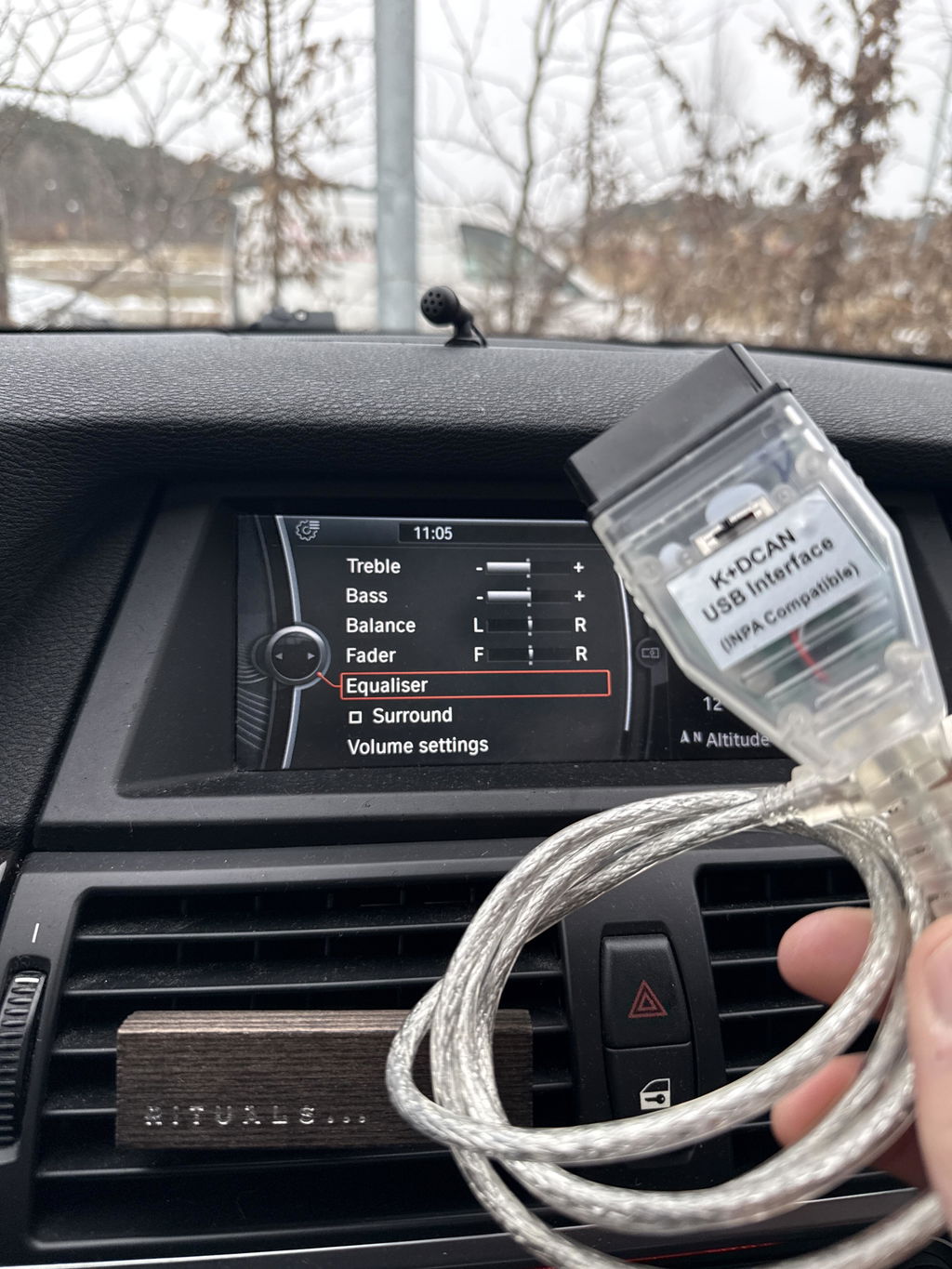
Quick Overview – K DCAN USB Interface OBD2 Scanner for BMW
The K DCAN USB Interface OBD2 Scanner is a powerful diagnostic tool for BMW models between 1998 and 2013. With a built-in switch and the stable FTDI FT232RL chip, you get reliable communication and full access to advanced diagnostic functions directly via your computer.
-
Compatibility: BMW E-series and some MINI models (1998–2013).
-
Protocol Support: D-CAN, PT-CAN, K-CAN, and BMW OBD standard.
-
Functions: Read & clear fault codes, adaptations, coding, programming.
-
Chip: FTDI FT232RL – stable USB communication.
-
Design: Plug-and-play via 16-pin OBD2 to USB.
With this interface, you can perform the same types of diagnostics as with dealership tools – but at a fraction of the cost. Perfect for both hobby users and professional workshops working with BMW.
K DCAN is a must-have for anyone who wants full control over their BMW's electronic system.
K DCAN USB Interface OBD2 Auto Scanner Tool for BMW – with Switch
The K DCAN USB Interface OBD2 Auto Scanner Tool is a powerful and reliable diagnostic tool for BMW models between 1998 and 2013. With the integrated switch and the well-known FTDI FT232RL chip, you get stable performance, broad protocol support, and the ability to perform advanced diagnostic functions on your BMW – directly via your computer.
This interface supports D-CAN, PT-CAN, and K-CAN and allows you to read and clear fault codes, perform adaptations, driver programming, and coding. Perfect for both private individuals and workshops who want a professional yet cost-effective tool.
Specifications
- Product Name: K DCAN USB Interface for BMW
- Chip: FTDI FT232RL (ensures stable communication)
- Function: With switch for protocol switching
- Protocols: D-CAN, PT-CAN, K-CAN, and BMW OBD standard
- Connection: 16-pin OBDII to USB
- Compatibility: BMW models 1998–2013
- Support: 12V vehicle diagnostics
- Length: approx. 1.5 m cable
- Material: Durable ABS plastic, reinforced cable
Functions & Applications
With the K DCAN interface, you can perform both basic and advanced diagnostic functions. Some examples of applications include:
-
Fault code reading & clearing: Identify problems and reset warning lights.
-
Adaptations: Adjust settings and parameters for various control units.
-
Coding: Enable or disable functions in the car.
-
Programming: Update software or drivers in the ECU and other control units.
-
Live data: See real-time information from the engine, transmission, and sensors.
Advantages of K DCAN USB Interface
- Built on FTDI FT232RL chip – secure and stable communication.
-
Switchable – easy switching between different protocols.
-
Full BMW diagnostics – same functions as dealership tools.
- Cost-effective alternative to OEM equipment.
- Plug-and-play – easy installation via USB.
Compatibility
The K DCAN USB Interface is compatible with BMW models from 1998 to 2013. Support includes cars with both K-Line and CAN-based protocols. Examples of models:
-
E60, E61 (from 03/2007)
-
E83 (from 09/2006)
-
E81, E87 (from 03/2007)
-
E90, E91, E92, E93 (from 03/2007)
-
E70 (X5 – new model)
-
R56 (MINI – new model)
Support is also available for older BMWs from 1995–1998 with OBD1/K-line and all models up to 2013 via the BMW OBD interface.
Protocol Support
-
D-CAN & PT-CAN: 500 kbit/s (fast CAN bus communication).
-
K-CAN: 100 kbit/s (slower CAN bus, used in some systems).
-
BMW OBD standard: Support for older vehicles and K-line communication.
Manual – Step-by-step installation
Preparation
- Download and install necessary BMW diagnostic software (e.g., INPA, Ediabas).
- Plug the interface into the computer's USB port. Install drivers for the FTDI FT232RL chip.
- Locate the car's OBD2 port (usually under the dashboard).
Connection & Usage
- Connect the OBD2 connector to the car's diagnostic socket.
- Start the car's ignition (the engine does not always need to be running).
- Start your BMW diagnostic software on the computer.
- Select the correct protocol via the switch on the interface depending on the car model and year.
- Run diagnostics: Read fault codes, clear faults, make adaptations, or perform coding.
Tips for Use
- Always use a computer with a stable power supply to avoid interruptions.
- Toggle the switch before starting communication, not during an active session.
- Ensure you have the correct software and version for your specific BMW model.
Frequently Asked Questions (FAQ)
Do I need to install drivers?
Yes, the FTDI FT232RL chip requires you to install FTDI drivers to function correctly with Windows.
Does this interface work on Mac?
The interface is primarily developed for Windows environments. Mac users may need an emulator or Boot Camp.
Can I damage the car through incorrect use?
No, but incorrect coding or programming can affect functions. Always follow the documentation and create backups.
Which software works best?
INPA and Ediabas are the most common software. It also works with other BMW-compatible diagnostic programs.
Does the interface work on other car brands?
No, this is specialized for BMW (and some MINI models). Other interfaces are required for other brands.
Tips & Advice
- Always have a stable internet connection when downloading software.
- Do not switch between CAN speeds during an active diagnostic session.
- Use a laptop with a good battery or AC adapter for long sessions.
- Document your changes when coding – so you can revert if needed.
Package Contents
- 1 × K DCAN USB Interface OBD2 Auto Scanner Tool with switch
- 1 × USB cable (integrated)
- Sold without software
Important Notes & Disclaimer
The product is intended for BMW diagnostics between 1998–2013. Incorrect use may lead to limited functionality. For coding and programming, you should have knowledge of BMW's control systems – otherwise, you risk activating incorrect functions.
The product does not replace professional OEM equipment but offers a very affordable alternative for hobby users and workshops.